Polypad.ink beta
Free, local CAD in your browser
Polypad is a free parametric CAD app that runs entirely in your browser: no install, no account, and your designs do not leave your device. It uses a real engineering solid kernel (Open CASCADE, compiled to WebAssembly), so you get precise parts with fillets, holes and booleans that export cleanly to STEP, STL and 3MF. It is built for people who design parts for 3D printing and want something faster to start than Fusion 360 and more private than Onshape.
Short demo
Free and local by design
Open the page and start modelling. There is no sign-up, no licence check and no limit on how many projects you keep.
- Your files stay on your machine. Projects live in your browser's own storage, not on remote servers.
- All the maths runs on your device. The geometry kernel runs in your browser, so modelling works on a train, in a workshop without Wi-Fi, or on a school Chromebook.
- No lock-in. Export a whole project as a
.polypad.jsonfile at any time, or export the model as STEP, STL or 3MF for your slicer or CAD tool. - Private by default. Nothing about your designs is shared unless you send the file to someone yourself.
- Snapshots, not cloud history. Save named versions (“v1 for printing”, “Before fillets”) and restore them in one click; they travel inside the exported file.
- A warning if your browser can't keep your work. If storage is blocked (some private windows), Polypad tells you and suggests exporting.
What you can build at this moment
- Parametric modelling: a feature history you can edit, reorder and suppress at any time, with undo and redo.
- Shapes and operations: boxes, cylinders, spheres and cones; extrude and revolve from sketches; join, cut and intersect; fillet, chamfer and shell; move, rotate and scale.
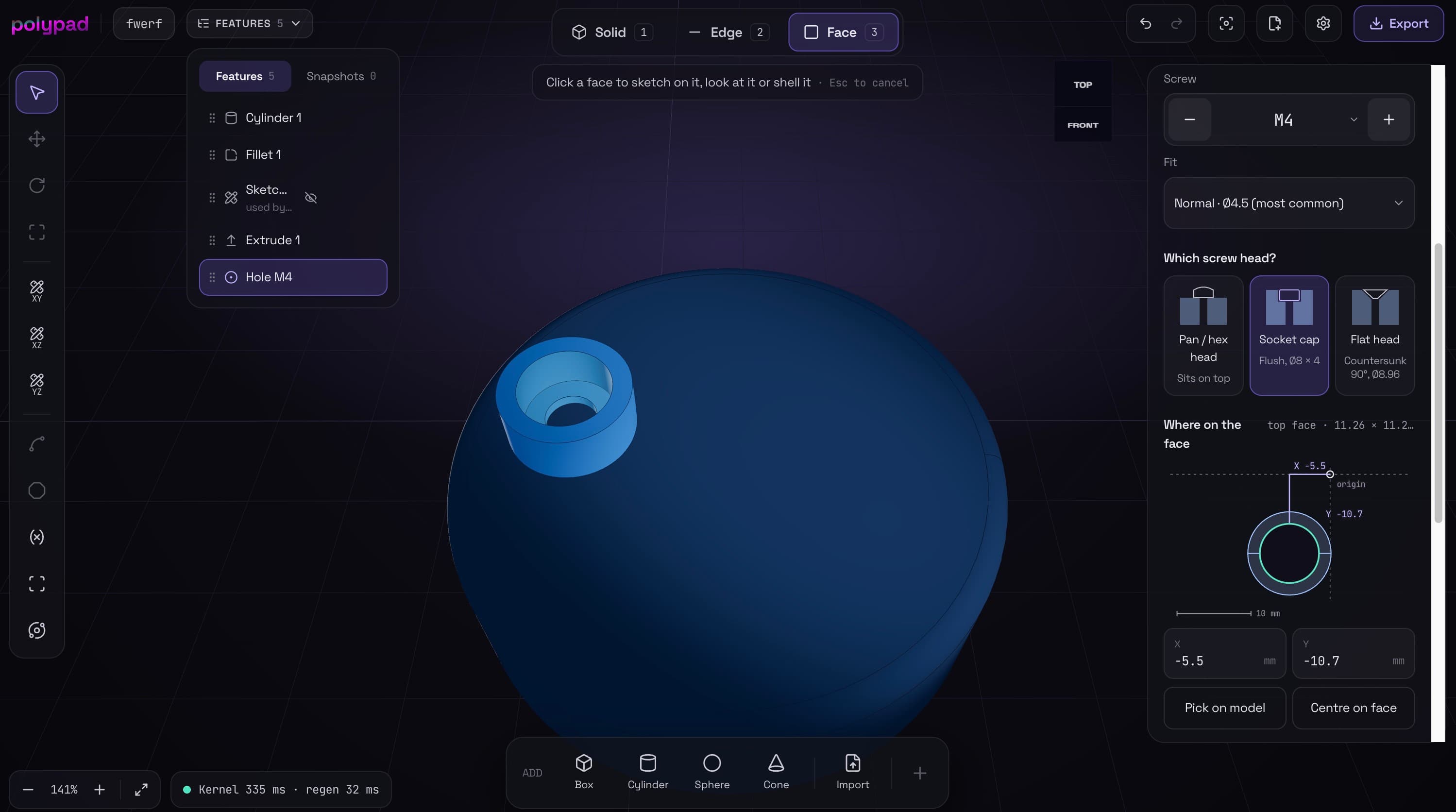
- Screw holes, the easy way: pick a face, say what goes in the hole (a screw passing through, one threading in, or a heat-set insert), choose M2 to M10, and Polypad picks the right clearance, tap drill or insert size, with counterbores and countersinks.
- Sketching: lines, rectangles, circles, arcs, slots and polygons, with constraints and dimensions, snapping, ortho mode and trim; sketch on any flat face.
- Parameters: named values and formulas (
width = 60,wall = width / 20) that drive any dimension. - Patterns and copies: rows, grids, circular patterns, mirror and duplicate.
- Import: STEP files keep their real faces and edges; STL files of any size come in as meshes you can cut, join, move, and add holes and sketches to.
- Export: STEP, STL and 3MF, with a units check before you download.
- Super basic templates: an enclosure with lid, a bracket and a spacer to start from.
How it compares with Fusion 360 and Onshape
Fusion 360 and Onshape are far bigger tools; Polypad wins on access and privacy, not on depth.
| Polypad | Fusion 360 (free personal use) | Onshape (free plan) | |
|---|---|---|---|
| Price | Free | Free for non-commercial hobby use only; paid otherwise | Free for non-commercial use only; paid otherwise |
| Account | None | Required | Required |
| Install | None, runs in the browser | Desktop app for Windows and macOS | None, runs in the browser |
| Where your files live | On your device | Autodesk cloud | Onshape cloud |
| Privacy of designs | Private, never uploaded | Private | Public: free-plan documents can be seen by anyone |
| Offline | Works fully offline | Needs to go online regularly to stay signed in | Needs a connection |
| Project limit | None | Capped number of editable documents | No cap, but all public |
| Linux and Chromebooks | Yes | No official support | Yes |
| Export | STEP, STL, 3MF, free | STL and STEP on the free tier | STL, STEP and more |
| Assemblies, drawings, CAM, simulation, collaboration | Not yet | Yes | Yes |
Fusion and Onshape terms summarised from their public plan pages as of October 2026; they change often.
Where Polypad differs:
- No strings. Fusion's free licence is limited to personal, non-commercial projects; Onshape's free plan makes your designs public. Polypad has neither condition.
- Nothing to install, nothing to sign into. Fusion needs a desktop install and an Autodesk account; Onshape needs an account and an internet connection the whole time.
- Made for 3D-print parts. Screw holes chosen by purpose, heat-set insert sizes, print templates and 3MF export are built in rather than added on.
- Honest limits. If you need assemblies with joints, 2D drawings, CAM, simulation or team collaboration today, Fusion and Onshape are the right tools.
Who it's for, and what's next
Polypad is for makers who want a precise bracket, enclosure or spacer printed this afternoon, on whatever computer is in front of them, without creating an account or giving their designs to a cloud. It also suits classrooms and shared computers, where installs and sign-ups are a hurdle.
Next on the roadmap:
- Feature patterns, such as a ring of holes around a flange
- Version history on top of the snapshots timeline
- More sketch tools, including offset
- Simple multi-body assemblies to check that parts fit
- A JavaScript API, an embeddable editor for other websites, and an MCP server so AI assistants can build parts directly